06 Apr Technical Writing Weekend Modules
Learn What Matters. One Weekend at a Time.
IMPORTANT! DO NOT SELECT MODULES from this page if you have enrolled in one of the following Certificate Courses:
“Modules are designed to fill skill gaps quickly and are ideal for busy professionals who want to stay sharp without long commitments.”
— Tech Writer’s Tribe Team
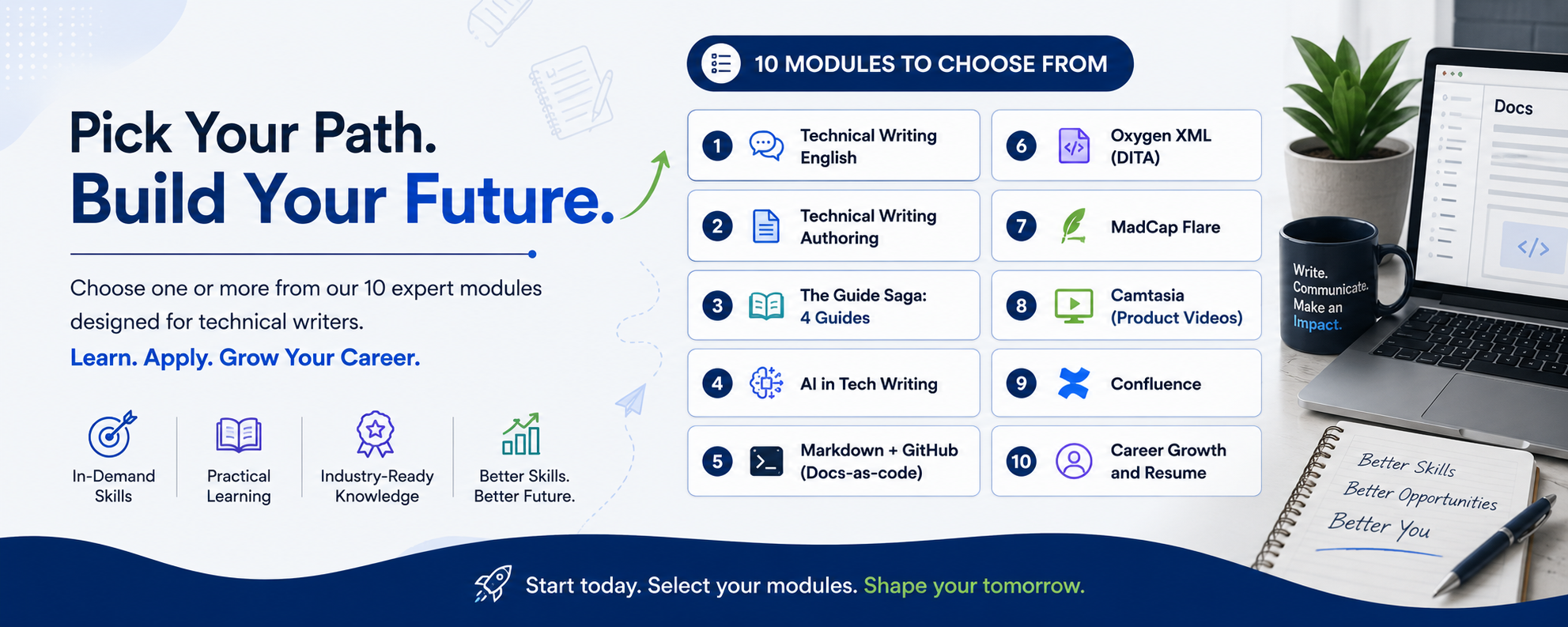
Technical Writing Weekend modules offer various courses over 8 consecutive weekends, designed for experienced technical writers. If you select more than one module together, you earn extra discounts.
Why Weekend Modules?
Not every technical writer needs a full course. Sometimes, you just want to sharpen a tool, practice a workflow, or learn a new platform.
That’s exactly what our Weekend Modules deliver.
Highlights:
✅ Bite-sized weekend learning (Sat–Sun only)
✅ Choose 1 or more modules
✅ Hands-on exercises, live mentoring
✅ Practical projects focused on real tools
Summary of Options
- W1 (May 2-3): Introduction + DDLC + Project Management (Agile) + Visuals
Activity: Work like a technical writer on a document - W2 (May 9-10): Technical Writing: English and Content Usage + Style guide (MSTP)
Activity: Grammar + Writing for UI - W3 (May 16-17): Global Authoring Processes
Activity: Writing Topics (DITA) + Minimalism + Structured Authoring - W4 (May 23-24): Guide Saga
Activity: Write 4 guides with templates - W5 (May 30-31): Oxygen XML Workshop
Activity: Prepare a DITA project using Oxygen XML
- W6 (Jun 6-7): Docs‑as‑Code process & Collaboration
Activity: Markdown + GitHub project using VSC editor - W7 (Jun 13-14): MadCap Flare Workshop
Activity: A doc project with output - W8 (Jun 20-21): Camtasia
Activity: Create Product Video - W9 (Jun 27-28): AI in Technical Writing
Activity: A project using Copilot - W10 (Jul 4-5): Career and Resume
Activity: Build your profile
Confluence Workshop
Activity: Prepare a project
Note: Only four seats are available for each module.
Batch 24 – Registration is Open: May 2-July 5, 2026
Registration Options
This program is ideal for:
- Working technical writers wanting to add new tools to their skillset
- Alumni of TWT certification courses
- Professionals seeking focused weekend learning
- Documentation specialists transitioning to structured authoring
⚡ Choose. Learn. Apply.
- Learn directly from expert mentors
- Maximum 4–5 participants per module for personal attention
- Hands-on practice in live sessions
- Participation certificate after each module
- Bundle discounts for 3+ modules
- Access to recordings and resources
The fee range per module: INR 1500-INR 3500.
You can avail a discount when selecting multiple modules. All possibilities are available:
- Select only Writing modules
- Select only doc tools
- Select a mix of Writing module + Doc Tool
- Select only one module
Course Details
Dates: May 2-3
- May 2: Introduction + Visuals
- May 3: Agile project for Tech Writers
May 2: Introduction to Technical Documentation and Technical Writing
- What is Technical Documentation
- Industry and Domains using Technical Documentation
- Key Skills Required
- Types of documentation
- Roles & career paths in documentation
- Global job market & expectations
Creating Clear Visuals: Diagrams, Screenshots, and Designs with SnagIt, Draw.io & Canva
By the end of the workshop, participants will be able to:
- Capture and annotate screenshots using SnagIt
- Create structured diagrams and workflows using Draw.io
- Design polished visuals and presentations using Canva
- Combine outputs from all three tools into professional visuals
May 3: Agile with JIRA for Project Management
Tool used: JIRA
For details, see Agile Module
Hands-on
- Analyze real documentation from leading tech companies
- Work on a document to know how a technical writer works
- Map documentation to SDLC stages
Dates: May 9-10
Instructor-led Live Online Sessions
Fundamentals of Technical Writing: English and Content Usage
Key Topics
-
Day 1: Writing Mechanics for Technical Clarity
-
Day 2: Applied Technical Writing Standards
Hands‑on
- Rewrite poorly written documentation
- Create a mini style guide
For details, see the course page.
Dates: May 16-17
Instructor-led Live Online Sessions
Global Authoring Processes in Technical Writing
- Audience analysis & user personas
- Structured writing
- Topic-based authoring (For DITA and other doc processes)
Authoring Types
- Modular Writing
- Topic-based writing
- Task-based writing
- Scenario-based writing
- Feature-based Writing
For details, see the course page.
Dates: May 23-24 (REGISTRATION CLOSED)
Instructor-led Live Online Sessions
The Guide Saga: Learn 4 guides
Key Topics
- User journeys & task‑based documentation
- Writing Release Notes, User Guide, Installation guide & tutorials (Quick Start Guide)
- Accessibility & inclusive documentation (WCAG)
Hands‑on
Write guides with global templates:
- User Guide
- Quick Start Guide
- Installation Guide
- Release Notes
For details, click here.
Dates: May 30-31
Workshop: DITA using Oxygen XML (A 2-day workshop)
Trainer: Amandeep Singh Talwar
Instructor-led Live Online Sessions
Learning Objectives
After the training, you should be able to
- Demonstrate familiarity and application with the DITA authoring environment
- Develop technical content using DITA authoring elements
DITA Workshop: As more and more companies implement DITA to simplify the development of technical content, the demand for technical communicators with DITA knowledge is growing. This 6-hours hands-on workshop is designed to teach you the basics of DITA.
Dates: Jun 6-7
Instructor-led Live Online Sessions
Docs‑as‑Code & Collaboration
Key Topics
- Docs‑as‑code concept & benefits
- Markdown & reStructuredText
- Version control with Git & GitHub/GitLab
- Pull requests & reviews
- Continuous documentation deployment
Tools
- GitHub
- VS Code Editor
- Markdown
Hands‑on
- Author using Markdown
- Create and manage documentation in a Git repository
View details
Dates: Jun 13-14
Instructor-led Live Online Sessions
Learning Technical Documentation Tools
MadCap Flare Workshop by Shrutika Dhake
In-session project (2 days, 6 hours) with Workshop: Introduction to MadCap Flare and learning how to use the single-sourcing tool to create a new project and publish it in the live practical session.
Date: Jun 20-21
Instructor-led Live Online Sessions
Video Learning: Camtasia
Creating Video using Camtasia by Yuvaraj R
- Learning Technical Documentation Tools (Camtasia for Video)
- In-session project with Workshop
- Learn to create videos for product documentation
Dates: Jun 27-28
AI in Technical Writing (Workshop)
Instructor-led Live Online Sessions
- Understand how AI tools interpret prompts and generate documentation
- Write effective prompts for different documentation types (tutorials, release notes, API reference)
- Evaluate AI output for clarity, accuracy, and tone
Develop a reusable prompt library for your team or organization - Apply prompt patterns to solve real documentation challenges
- Hands-On Activities
Dates: Jul 4-5
Instructor-led Live Online Sessions
Jul 5: Confluence Workshop
Jul 4: Career Preparation & Job Readiness
Key Topics
- Building a documentation portfolio
- Resume & LinkedIn optimization
- Technical writing interviews
- Freelancing & remote opportunities
Searching and applying for jobs
Resume
- Functional resumes (For Freelancers)
- Chronological resumes (For a job)
- Tailoring a resume for a specific role
Technical writing interviews
- Preparing for a writing interview: research required and where and how to do it
- Interview techniques: behavioral and technical
- Common questions and how to handle them?
- STAR stories: what are they and when to use them in interviews?
- Writing portfolio – how to make, when and where to use.
Meet the Trainer: Sumedh Nene
Sumedh has been in technical communications with a global experience for over 25 years. He was a lead faculty at George Brown College, Toronto for 9 years teaching several subjects in Diploma in Technical Writing.
He has worked with clients like Cisco, HP, Philips, Deutschland Bank, Levi’s across US, Canada, India and Australia. During his time in Canada, he conducted over 100 workshops for newcomers to Canada on job search tips, tricks and techniques.
Currently, Sumedh works as an Information Architect for a multinational company based in Pune.
Jul 5 Confluence Workshop by Mridula Menon
Instructor-led Live Online Sessions
In-session project with Workshop
- Core Concepts
- Creating projects and publishing
Frequently Asked Questions
Yes, every module is standalone. Registering for multiple modules together saves cost.
Yes. You’ll have access to all recordings and materials. You can access the recording for 3 months. Annual Members can access for 6 months or more.
Yes, a participant certification is provided to all who attend the session. Please note that if you register but do not attend the session, you will get only the recording and resources. We provide certificate only to those who participate in all these workshop-based sessions.
Testimonials
Punit, the instructor, demonstrated patience and clarity, always willing to assist with troubleshooting and in-depth explanations. His commitment to helping participants even beyond the sessions speaks volumes about their passion for teaching and mentorship.
This experience has been truly enriching, equipping me with valuable insights that I am excited to apply in my professional journey. I am grateful for the knowledge shared and look forward to staying connected.
Thank you for an impactful and rewarding learning experience!
The course was structured aptly that anyone can master the tool within that session.


Gafoor Dudekula
Posted at 16:13h, 17 JulyLooking forward to gain some knowledge
Gafoor Dudekula
Posted at 11:11h, 14 AugustWilling to learn
K_admin
Posted at 13:34h, 14 AugustThank you. Let us know if you need any help in joining the courses.
Kayalvizhi
Posted at 11:31h, 19 OctoberWilling to learn
Naveenraj Iyyappan
Posted at 20:01h, 27 OctoberEagerly waiting to explore