
16 Oct Technical Writing Refresher Certification Course


Refresh. Relearn. Rise Higher as a Technical Writer.
A course where you learn more about AI usage in technical writing every week.
The course has two parts:
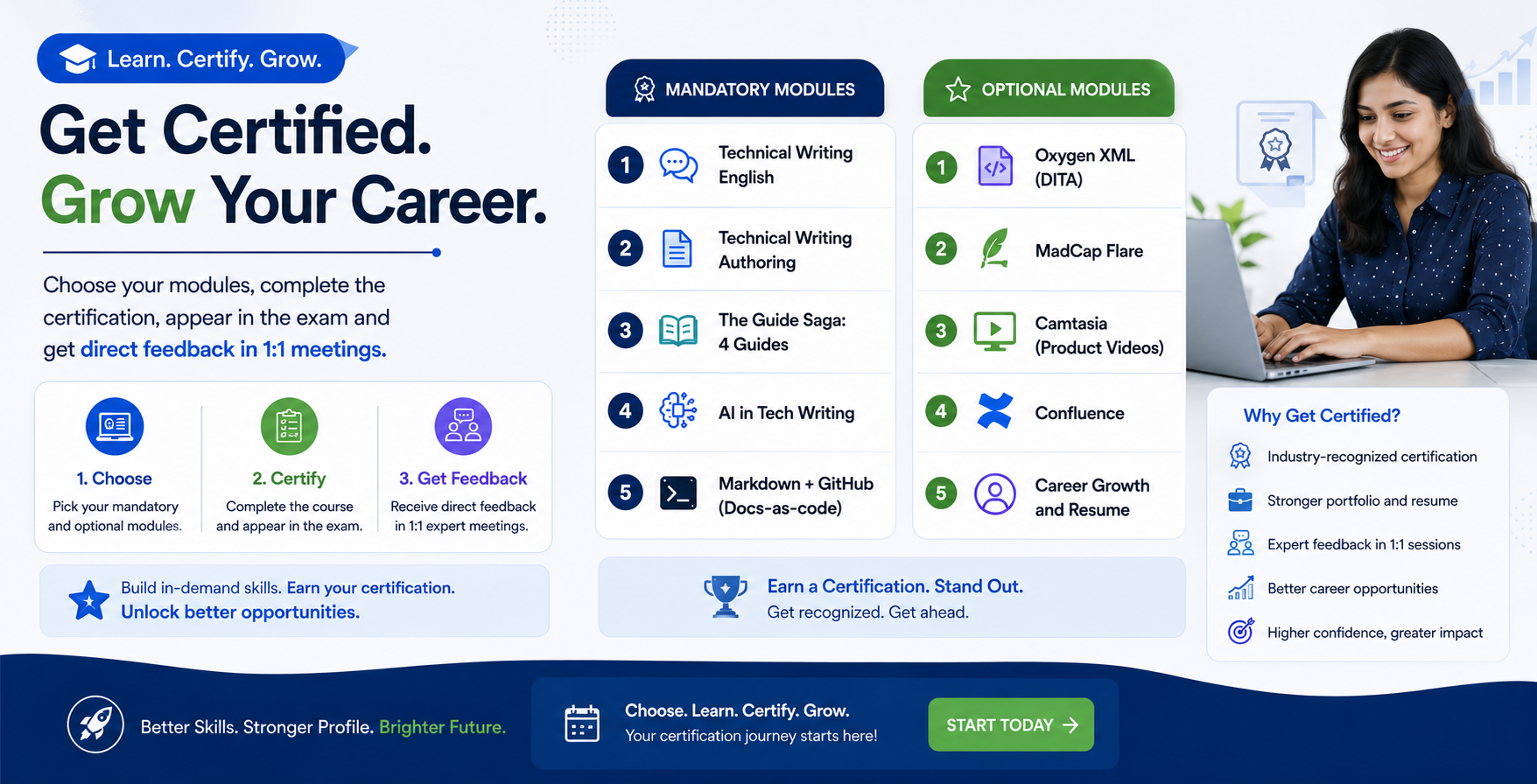
- Mandatory modules (5 weeks)
- Additional modules (join as many as you need)
Registration is open for Batch 25: Aug 22-Oct 18, 2026
Why a Refresher?
Even seasoned technical writers need to stay current, with tools, technologies, and writing standards evolving every few months.
This course helps you:
✅ Upgrade your toolset (Confluence, Markdown, GitHub, DITA Oxygen XML, MadCap Flare, Camtasia, Copilot, JIRA, SnagIt)
✅ Revisit fundamentals of structured authoring and content reuse
✅ Strengthen your editing and review process
✅ Learn the current trend: AI in Technical Writing
IMPORTANT! DO NOT SELECT MODULES from this page if you have enrolled in the Technical Writing Fundamentals Certificate Course.
Additionally, if you prefer not to have your assignments reviewed and would like to attend workshop-based sessions only, we recommend joining the Weekend Modules.
“Even experienced writers benefit from reflection — the refresher course is built to challenge assumptions and upgrade tool familiarity.”
— Tech Writer's Tribe Academy Mentor Panel
Technical Writing Refresher Course Details
- W1 (Aug 22-23): Introduction + DDLC + Project Management (Agile) + Visuals
Activity: Work like a technical writer on a document - W2 (Aug 29-30): Technical Writing: English and Content Usage + Style guide (MSTP)
Activity: Grammar + Writing for UI - W3 (Sept 5-6): Global Authoring Processes
Activity: Writing Topics (DITA) + Minimalism + Structured Authoring - W4 (Sept 12-13): Guide Saga
Activity: Write 4 guides with templates - W5 (Sept 19-20): Oxygen XML Workshop
Activity: Prepare a DITA project using Oxygen XML
- W6 (Sept 26-27): Docs‑as‑Code process & Collaboration
Activity: Markdown + GitHub project using VSC editor - W7 (Oct 3-4): MadCap Flare Workshop
Activity: A doc project with output - W8 (Oct 10-11): Camtasia
Activity: Create Product Video - W9 (Oct 17): AI in Technical Writing
Activity: A project using Copilot - W9 (Oct 18): Confluence Workshop
Activity: Prepare a project
Course Details
Dates: Aug 22-23
- Aug 22: Introduction + Visuals
- Aug 23: Agile project for Tech Writers
Aug 22: Introduction to Technical Documentation and Technical Writing
- What is Technical Documentation
- Industry and Domains using Technical Documentation
- Key Skills Required
- Types of documentation
- Roles & career paths in documentation
- Global job market & expectations
Creating Clear Visuals: Diagrams, Screenshots, and Designs with SnagIt, Draw.io & Canva
By the end of the workshop, participants will be able to:
- Capture and annotate screenshots using SnagIt
- Create structured diagrams and workflows using Draw.io
- Design polished visuals and presentations using Canva
- Combine outputs from all three tools into professional visuals
Aug 23: Agile with JIRA for Project Management
Tool used: JIRA
For details, see Agile Module
Hands-on
- Analyze real documentation from leading tech companies
- Work on a document to know how a technical writer works
- Map documentation to SDLC stages
Dates: Aug 29-30
Instructor-led Live Online Sessions
Fundamentals of Technical Writing: English and Content Usage
Key Topics
Day 1: Writing Mechanics for Technical Clarity
Day 2: Applied Technical Writing Standards
Hands‑on
- Rewrite poorly written documentation
- Create a mini style guide
For details, see the course page.
Dates: Sept 5-6
Instructor-led Live Online Sessions
Global Authoring Processes in Technical Writing
- Audience analysis & user personas
- Structured writing
- Topic-based authoring (For DITA and other doc processes)
Authoring Types
- Modular Writing
- Topic-based writing
- Task-based writing
- Scenario-based writing
- Feature-based Writing
For details, see the course page.
Dates: Sept 12-13
Instructor-led Live Online Sessions
The Guide Saga: Learn 4 guides
Key Topics
- User journeys & task‑based documentation
- Writing Release Notes, User Guide, Installation guide & tutorials (Quick Start Guide)
- Accessibility & inclusive documentation (WCAG)
Hands‑on
Write guides with global templates:
- User Guide
- Quick Start Guide
- Installation Guide
- Release Notes
For details, click here.
Dates: Sept 19-20
Workshop: DITA using Oxygen XML (A 2-day workshop)
Trainer: Amandeep Singh Talwar
Instructor-led Live Online Sessions
Learning Objectives
After the training, you should be able to
- Demonstrate familiarity and application with the DITA authoring environment
- Develop technical content using DITA authoring elements
DITA Workshop: As more and more companies implement DITA to simplify the development of technical content, the demand for technical communicators with DITA knowledge is growing. This 6-hours hands-on workshop is designed to teach you the basics of DITA.
Dates: Sept 26-27
Instructor-led Live Online Sessions
Docs‑as‑Code & Collaboration
Key Topics
- Docs‑as‑code concept & benefits
- Markdown & reStructuredText
- Version control with Git & GitHub/GitLab
- Pull requests & reviews
- Continuous documentation deployment
Tools
- GitHub
- VS Code Editor
- Markdown
Hands‑on
- Author using Markdown
- Create and manage documentation in a Git repository
Dates: Oct 3-4
Instructor-led Live Online Sessions
Learning Technical Documentation Tools
MadCap Flare Workshop by Shrutika Dhake
In-session project (2 days, 6 hours) with Workshop: Introduction to MadCap Flare and learning how to use the single-sourcing tool to create a new project and publish it in the live practical session.
Date: Oct 10-11
Instructor-led Live Online Sessions
Video Learning: Camtasia
Creating Video using Camtasia by Yuvaraj R
- Learning Technical Documentation Tools (Camtasia for Video)
- In-session project with Workshop
- Learn to create videos for product documentation
Dates: Oct 17
AI in Technical Writing (Workshop)
Instructor-led Live Online Sessions
- Understand how AI tools interpret prompts and generate documentation
- Write effective prompts for different documentation types (tutorials, release notes, API reference)
- Evaluate AI output for clarity, accuracy, and tone
Develop a reusable prompt library for your team or organization - Apply prompt patterns to solve real documentation challenges
- Hands-On Activities
Dates: Oct 18
Instructor-led Live Online Sessions
Confluence Workshop by Mridula Menon
In-session project with Workshop
- Core Concepts
- Creating projects and publishing
Highlights
- Sessions: 8- 18 sessions as per options selected
- Mandatory: 9 Sessions on Authoring (English – Week 2, Authoring – Week 3, Guides – Week 4, Markdown – Week 6, AI in Tech writing – Week 9 Day 1)
- Assignments: Evaluated and Feedback provided
- Personal Care: One 1:1 meeting of 1 hour for 4 modules, two 1:1 meetings of 1 hour each for 6 or more modules
- Resources: Recording and Toolkit shared
- Successful Certification: After scoring a minimum of 70% marks
- Job Assistance: Connecting to the community for job referrals
- Students from multiple countries (outside India) have participated. For example, USA, Canada, Australia, UK, Germany, Netherlands, France, Ukraine, Israel, Prague, Qatar, Egypt, UAE, Singapore, Malaysia, Nepal, and Sri Lanka
- 300+ technical writers have completed the Refresher course
This course is ideal for:
- Technical writers with 6 months+ experience
- Past TWT Fundamentals graduates
- Writers returning to the profession after a break
- Professionals seeking to upskill quickly over weekends
Learning Beyond Theory:
- 18 live sessions (recordings provided)
- 1-2 personal mentorship calls
- Recording provided for 6 months
- Practical assignments reviewed by mentors
- Certification after successful completion (70% or above)
- Career guidance + interview preparation
- Access to community groups and alumni network
Mandatory: 5 Modules
- Four modules of Writing
- Docs as Code.
The course has four types of Modules:
- Writing Only: 5 Modules, 9 Sessions (English, Authoring, Guide, Agile, AI in TW)
- Documentation Tools Workshop: 5 Weekends, 19 Sessions (Oxygen XML, MadCap Flare, Confluence, Camtasia, Markdown + GitHub)
- Trend: Week 9 (AI in Technical Writing with MS Copilot)
- Docs as code with Markdown, GitHub and VSC editor
Individual Fee:
- Varies based on the number of modules selected.
- Minimum Fee (Mandatory Modules): INR 14,000
- Maximum Fee (9 Weekends): INR 28,500
- View the Registration form for the respective fee of all options
Fees for 12 Modules:
- INR 14,000: 5 Modules – Writing + AI
- INR 17,000: 5 Modules – Writing + AI + 1 tool
- INR 20,000: 6 Modules – Writing + AI + 2 tools
- INR 22,000: 7 Modules – Writing + AI + 3 tools
- INR 24,000: 8 Modules – Writing + AI + 4 tools
- INR 26,500: 9 Modules – Writing + AI + All 5 tools
Summary: Batch 23
- Duration of Training: 2-3 Months
- Only Technical Writing – Sessions: 10 Weekends, 20 Sessions, 60 hours
- Technical Writing with API Documentation- Sessions: 13 Weekends, 26 Sessions, 75 hours
- Dates of Sessions:
- May 2-3, 9-10, 16-17, 23-24, 30-31
- Jun 6-7, 13-14, 20-21, 27-28, Jul 4-5
- API Course: Jul 11-12, 18-19, 25-26 (10.15 AM-12.45 PM)
- Time: 2.30-5.30 PM Indian Standard Time (For 20 sessions of the first 10 weeks)
Testimonials
See testimonials and the success of our students from the previous batches. Click to view Testimonials
Why Tech Writer's Tribe Technical Writing Course?
- Unique Syllabus: We cover what the experienced technical writers and documentation managers recommend.
- Security of Your time, money and hope: With our professional dedicated service, we always follow the schedule and help you learn with personal care.
- Transparency in public domain: Hidden discussions, promises on calls could be misleading. We do not surprise you with broken promises. We deliver what we promise. Our promise is available on a public page (not hidden in emails or phone calls)
About the Trainers
About the Instructor
The course will be conducted by multiple instructors led by Punit Shrivastava.
Punit Shrivastava is involved in mentoring and helping technical writing community for a long time. He prefers sharing knowledge and learning with the focus on having a skilled community. He has 23+ years of experience in the field of writing that spreads across writing for English daily, The Asian Age, and 20+ experience in technical documentation.
Frequently Asked Questions
A: Yes, you can pick one of 12 options.
Fundamentals covers the basics for beginners. A beginner is someone who has not worked as a technical writer in the IT industry. Refresher focuses on enhancing the existing skills and tools of the experienced technical writers.
All sessions are live and interactive, with recordings shared for revision.
There are many differences. Primarily, in this course, you need to submit assignments and appear in exam. All your submissions are reviewed after the sessions. Then, you also get separate personal care through 1:1 meetings. In Weekend modules, you can attend the sessions, but do not get personal care.
Registration
Please fill out the registration form selecting the desired options. You can make the payment first to our UPI ID; techwriters@icici.
Note: Payment through Cards incur transaction charges from payment gateway. If you need to pay using cards, connect with us and we will share the link to pay. The fee will be higher than what you pay using direct UPI mode to us.
Sorry, the comment form is closed at this time.